> ## Documentation Index
> Fetch the complete documentation index at: https://docs.visual-layer.com/llms.txt
> Use this file to discover all available pages before exploring further.
# Task Manager
> Monitor and manage all dataset operations including creation, enrichment, and processing tasks.
The **Task Manager** provides a unified view of all dataset-related operations across your **Visual Layer** workspace. It tracks processes such as dataset creation, media addition, re-indexing, label propagation, model training, model validation, snapshot operations, enrichment, and custom metadata imports, displaying their current status, progress, and any errors that occurred.
Use the **Task Manager** to:
* Monitor active operations in real-time.
* Track operation history from the past 14 days.
* Identify and troubleshoot failed processes.
The **Task Manager** maintains a visible history of all operations performed in the past 14 days. Older tasks are automatically archived.
## Accessing the Task Manager
The **Task Manager** is available from any screen in Visual Layer.
1. Go to the **Navigation Panel** on the left side of the screen.
2. Click the **Task Manager** icon  .
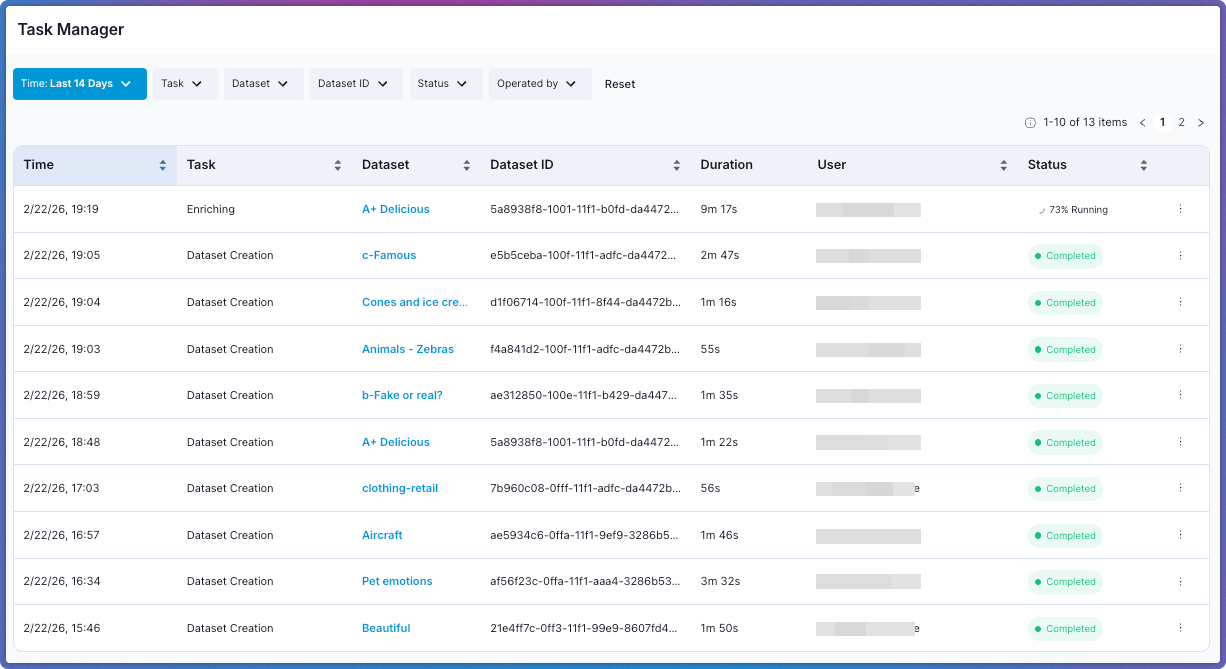
The **Task Manager** opens, displaying all operations from the past 14 days.
.
The **Task Manager** opens, displaying all operations from the past 14 days.
 If no operations have been performed in the past 14 days, the table appears empty with a notification indicating no recent activity.
## Understanding the Task Table
The **Task Manager** displays all operations in a table format. Each row represents a single task and contains the following information:
If no operations have been performed in the past 14 days, the table appears empty with a notification indicating no recent activity.
## Understanding the Task Table
The **Task Manager** displays all operations in a table format. Each row represents a single task and contains the following information:
| Column | Description |
| -------------- | ------------------------------------------------------------------------------------------------------------------------------------------------------------------------------------------------------------------------------------------------------------------------------------------------------- |
| **Time** | The timestamp when the operation was initiated. |
| **Task** | The type of operation being performed. See [Task Types](#task-types) below for a description of each task type. |
| **Dataset** | The name of the dataset where the operation is running or was performed. Click the dataset name to navigate directly to its **Explore** page. |
| **Dataset ID** | The unique identifier for the dataset. |
| **Duration** | The elapsed time since the operation started (for running tasks) or the total time the operation took (for completed tasks). The counter starts only once the task begins processing — tasks in **Pending** status do not accumulate duration. Sort by this column to identify long-running operations. |
| **User** | The user who initiated the task. (Cloud deployments only.) |
| **Status** | The current state of the operation with progress percentage. See [Task Statuses](#task-statuses) below for detailed descriptions. |
| **Actions** | Access the task's unique identifier for copying. |
The **Task Manager** tracks operation-level status independently from overall dataset status. A dataset can show **Ready** status in the **Dataset Inventory** even when the **Task Manager** displays completed tasks like **Enrichment** or **Training**, since these operations do not block dataset access.
## Working with the Task Table
The table displays tasks ordered by **Time** by default, with the most recent operations appearing first. Click any column header to sort tasks in ascending or descending order.
### Filtering Tasks
The filter bar at the top of the table narrows the task list by multiple criteria.
| Filter | Description |
| --------------- | -------------------------------------------------------------------------------------------------------------------------- |
| **Time** | Filter by time range: **Last 24 Hours**, **Last 7 Days**, or **Last 14 Days** (default). |
| **Task** | Filter by task type (Dataset Creation, Media Addition, Reindex, Snapshot Restore, Snapshot Clone, Enrichment, and others). |
| **Dataset** | Filter by dataset name. |
| **Dataset ID** | Filter by the unique dataset identifier. |
| **Status** | Filter by task status (Pending, Initializing, Running, Completed, Failed, Aborted). |
| **Operated by** | Filter by the user who triggered the task. |
Click **Reset** to clear all filters and return to the default view.
### Sorting Tasks
Click any column header to sort tasks in ascending or descending order:
* **Duration**: Identify long-running or slow operations.
* **Time**: View operations chronologically.
* **Dataset**: Group tasks by dataset.
### Retrieving Task IDs
Task IDs are useful when contacting **Visual Layer** support about specific operations.
1. Click the **Actions** menu (three dots) for the relevant task row.
2. Select **Copy Task ID**.
The ID is copied to your clipboard.
## Task Statuses
All tasks display one of the following statuses to indicate their current state. Each status includes a percentage to show progress through the operation.
| Status | Description |
| ---------------- | ----------------------------------------------------------------------------------------------------------------------------------------------------------------------------------------------------------------------------------------------------------------------------------- |
| **Pending** | The task is queued and waiting for a required resource to become available. Multiple pipeline tasks can run in parallel when resources allow, but GPU-bound tasks such as dataset creation run one at a time. The duration counter does not start until the task begins processing. |
| **Initializing** | The operation is performing initial validations, uploading data, or downloading resources. Progress percentage reflects completion of initialization steps. |
| **Running** | The operation is actively processing. Progress percentage reflects completion of the overall operation. |
| **Completed** | The operation completed successfully. Progress shows 100%. |
| **Failed** | The operation encountered an error and could not complete. Hover over the status to view the error message explaining what went wrong. |
| **Aborted** | The operation was manually stopped by a user before completion. |
## Task Types
Each entry in the **Task** column represents one of the following operations:
| Task | Description |
| --------------------- | -------------------------------------------------------------------------------------------------------------------------------------------------------- |
| **Dataset Creation** | Creating a new dataset from uploaded media. Triggered when you complete the dataset creation wizard. |
| **Media Addition** | Adding new image or video files to an existing dataset. |
| **Reindex** | Re-indexing a dataset to fully incorporate newly added media into the dataset index. Follows a **Media Addition** task when a full re-index is required. |
| **Enrichment** | Running an enrichment model on a dataset. Triggered from the enrichment panel for that dataset. |
| **Label Propagation** | Propagating labels across similar items in the dataset. |
| **Model Training** | Training a custom model using dataset data. |
| **Model Validation** | Validating a trained model against dataset data. |
| **Custom Metadata** | Importing custom metadata into a dataset. |
| **Snapshot Restore** | Rolling back the dataset to the state captured by a specific snapshot. Triggered from the **Snapshot Catalog**. |
| **Snapshot Clone** | Creating a new, independent dataset from the data in a specific snapshot. Triggered from the **Snapshot Catalog**. |
## Task Concurrency
When a data-modifying task runs, the dataset enters **Read Only** status and other data-modifying tasks are blocked until the current task completes.
| Dataset Status | Available Operations | Blocked Operations |
| ----------------- | ----------------------------------------------------------------------- | ---------------------------------------------------------------------------------------------------------- |
| **Ready** | All operations | None |
| **Read Only** | Visual Search, Semantic Search, filtering, share dataset, add user tags | Media Addition, re-indexing, Snapshot Create/Restore/Clone, enrichment, label propagation, custom metadata |
| **Partial Index** | Add media, re-index, Snapshot Create/Restore/Clone | Enrichment, label propagation, custom metadata |
A dataset enters **Read Only** status when enrichment, re-indexing, label propagation, custom metadata, or snapshot tasks are active. It enters **Partial Index** status after new media is added but before re-indexing completes.
**Model Training** and **Model Validation** tasks do not restrict dataset access. The dataset remains **Ready** while these tasks run.
## Monitoring Active Operations
The **Task Manager** updates automatically as tasks progress. Active operations display real-time updates:
* **Progress percentage** increases as the task advances.
* **Duration** counts up continuously for running tasks.
* **Status** changes reflect task state transitions.
Keep the **Task Manager** open in a separate browser tab to monitor long-running operations without interrupting your work in datasets.
## Troubleshooting Failed Tasks
When a task shows **Failed** status:
1. Hover over the status or click the task row to view error details.
2. Review the error message for specific failure reasons.
3. Common issues include:
* Insufficient storage space.
* Invalid metadata formats.
* Network connectivity problems.
* Incompatible file types.
4. After resolving the issue, retry the operation from the relevant dataset or workflow.
Failed dataset creation tasks require starting the creation process again. Failed enrichment tasks can be retried from the enrichment panel for that dataset.
## Task Manager Limitations
Keep the following constraints in mind when working with the **Task Manager**:
* **14-Day History Window**: The **Task Manager** only displays operations from the past 14 days. Older tasks are automatically archived.
* **Read-Only Interface**: You cannot cancel or modify most running tasks directly from the **Task Manager**. To stop an operation, navigate to the dataset and use the relevant controls. Dataset creation tasks can be aborted and retried via the [Task Manager API](/api-reference/task-manager).
* **No Bulk Actions**: Each task must be reviewed or managed individually.
## Related Resources
Create datasets and monitor creation tasks.
Enrich datasets and track enrichment tasks.
Track snapshot restore and clone operations in the Task Manager.
List, abort, and retry tasks programmatically.