> ## Documentation Index
> Fetch the complete documentation index at: https://docs.visual-layer.com/llms.txt
> Use this file to discover all available pages before exploring further.
# VL Chat
> Explore and search your visual datasets using natural language queries with VL Chat's conversational interface.
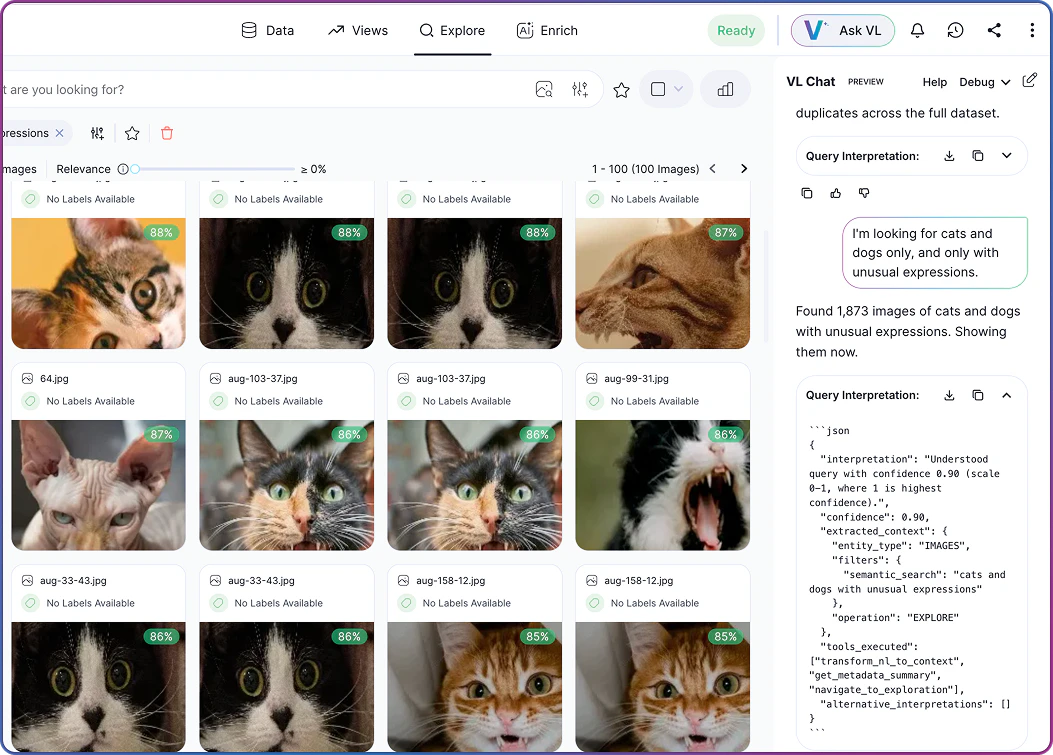
**VL Chat** enables you to explore visual datasets through natural language. Instead of navigating filters and dropdown menus, ask questions directly — find images by quality issue, label, tag, custom metadata, or cluster. The system interprets your intent and returns results with explanations of what it found.
## Common Use Cases
**VL Chat** supports a range of workflows across dataset exploration and curation:
| Use Case | Description | Examples |
| ------------------------- | ------------------------------------------- | --------------------------------------------------------------------------------------------------------------------------------------------------------------------------- |
| **Quality Assurance** | Quickly identify and review quality issues. | "Show me all blur issues from today's production run"
"Find outlier images in batch 12345"
"Display mislabeled images above 90% confidence" |
| **Dataset Curation** | Organize and filter datasets for training. | "Show me the most unique images from each cluster"
"Find images labeled as cats that don't have the reviewed tag"
"Display images with low uniqueness scores" |
| **Research and Analysis** | Explore dataset composition and patterns. | "Show me the largest clusters"
"Find images with the most labels"
"Display images that appear in multiple clusters" |
## How to Use VL Chat
To access **VL Chat**, open any dataset in Visual Layer and click  in the top navigation bar. The chat interface appears as a panel on the right side of your screen, allowing you to explore while viewing your dataset.
Each dataset maintains its own conversation thread, which persists across sessions. To start a fresh conversation, click **New Thread** in the chat panel.
### Asking Questions
Type your question in natural language into the chat input field and press Enter. **VL Chat** processes your query and returns results along with an explanation of what it understood and what it found.
Query capabilities depend on the dataset configuration. **VL Chat** can only search fields that exist in your data: datasets without annotations cannot filter by labels, and cluster-based queries require **Similarity Clusters** to be generated first. If you reference a field that isn't configured, the system explains this and applies the filters it can.
**Example queries:**
* "Show me images with blur issues"
* "Find all images tagged as defective"
* "Display images from cluster 5"
* "Show me images with high uniqueness scores"
* "Find images labeled as cats"
in the top navigation bar. The chat interface appears as a panel on the right side of your screen, allowing you to explore while viewing your dataset.
Each dataset maintains its own conversation thread, which persists across sessions. To start a fresh conversation, click **New Thread** in the chat panel.
### Asking Questions
Type your question in natural language into the chat input field and press Enter. **VL Chat** processes your query and returns results along with an explanation of what it understood and what it found.
Query capabilities depend on the dataset configuration. **VL Chat** can only search fields that exist in your data: datasets without annotations cannot filter by labels, and cluster-based queries require **Similarity Clusters** to be generated first. If you reference a field that isn't configured, the system explains this and applies the filters it can.
**Example queries:**
* "Show me images with blur issues"
* "Find all images tagged as defective"
* "Display images from cluster 5"
* "Show me images with high uniqueness scores"
* "Find images labeled as cats"
 #### Types of Queries You Can Ask
**VL Chat** understands queries about different aspects of your dataset:
#### Types of Queries You Can Ask
**VL Chat** understands queries about different aspects of your dataset:
| Type | Description | Examples |
| ----------------------------- | ------------------------------------------------------------------------ | ----------------------------------------------------------------------------------------------------------------------------------------------------------------------------------- |
| **Filter by Issues** | Find images with specific quality issues detected by Visual Layer. | "Show me blurry images"
"Find all images with duplicates"
"Display images that have outlier issues"
"Show me images with mislabel issues above 80% confidence" |
| **Filter by Labels** | Search for specific labels or annotations in your dataset. | "Show me images labeled as cats"
"Find all images with car labels"
"Display images labeled as defective" |
| **Filter by Tags** | Query images based on user-assigned tags. | "Show me images tagged as urgent"
"Find all images with the reviewed tag"
"Display images tagged for training" |
| **Filter by Custom Metadata** | Query **Custom Metadata** fields directly if your dataset includes them. | "Show me images with temperature above 30"
"Find images from Station A"
"Display images where batch number is 12345" |
| **Navigate Clusters** | Explore **Similarity Clusters** in your dataset. | "Show me cluster 5"
"Display the largest cluster"
"Find clusters with more than 100 images" |
| **Combine Multiple Criteria** | Build complex queries by combining different filter types. | "Show me blurry images from cluster 3"
"Find images labeled as cats with high uniqueness scores"
"Display images tagged as urgent that also have blur issues" |
#### Tips for Effective Queries
Use these guidelines to get accurate, relevant results from **VL Chat**:
| Rule | Explanation | Good | Less Clear |
| ------------------------------------- | ----------------------------------------------------------------------------------- | -------------------------------------------------------------------------------------------------------- | --------------------------------------------------------------------------- |
| **Be Specific About Filter Types** | When referencing labels, tags, or custom fields, use clear terminology. | "Show me images labeled as defective" | "Show me defective images" (could refer to labels, tags, or quality issues) |
| **Use Exact Field Names** | For custom metadata, use the exact field name as it appears in your dataset. | "Show me images where Station equals A" | "Show me images from station A" (if the field is named "StationID") |
| **Specify Thresholds Explicitly** | When filtering by numeric values or confidence scores, include specific thresholds. | "Show me blur issues above 85% confidence" | "Show me images with high blur" (what threshold defines "high"?) |
| **Build Complex Queries Iteratively** | Start with a simple query and refine it through follow-up questions. | "Show me images with blur"
"Now filter to cluster 5"
"Show only the ones tagged as urgent" | "Show me blurry images from cluster 5 tagged as urgent" |
### Understanding Responses
When you ask a question, **VL Chat** provides:
* **Interpretation summary**: A clear statement of what the system understood from your query.
* **Validation feedback**: Information about which parts of your query were applied successfully and which weren't available.
* **Visual results**: The actual images or objects matching your criteria.
* **Alternative interpretations**: Suggestions if your query was ambiguous or if certain fields aren't available.
Each response includes a confidence score. Lower scores (below 0.5) indicate ambiguity. If results don't match your expectations, review the alternative interpretations provided — these often reveal where the system interpretation differed from your intent. For complex criteria, break queries into multiple steps rather than a single nested question.
**Example response:**
```
Understood query with confidence 0.85. Applied blur filter successfully and
filtered to cluster 5. Showing 47 images that match your criteria.
```
If part of your query can't be processed, the system explains why:
```
I found 23 blurry images in your dataset. Note: This dataset doesn't have a
'Temperature' custom metadata field configured, so I could only search for blur.
```
### Multi-Turn Conversations
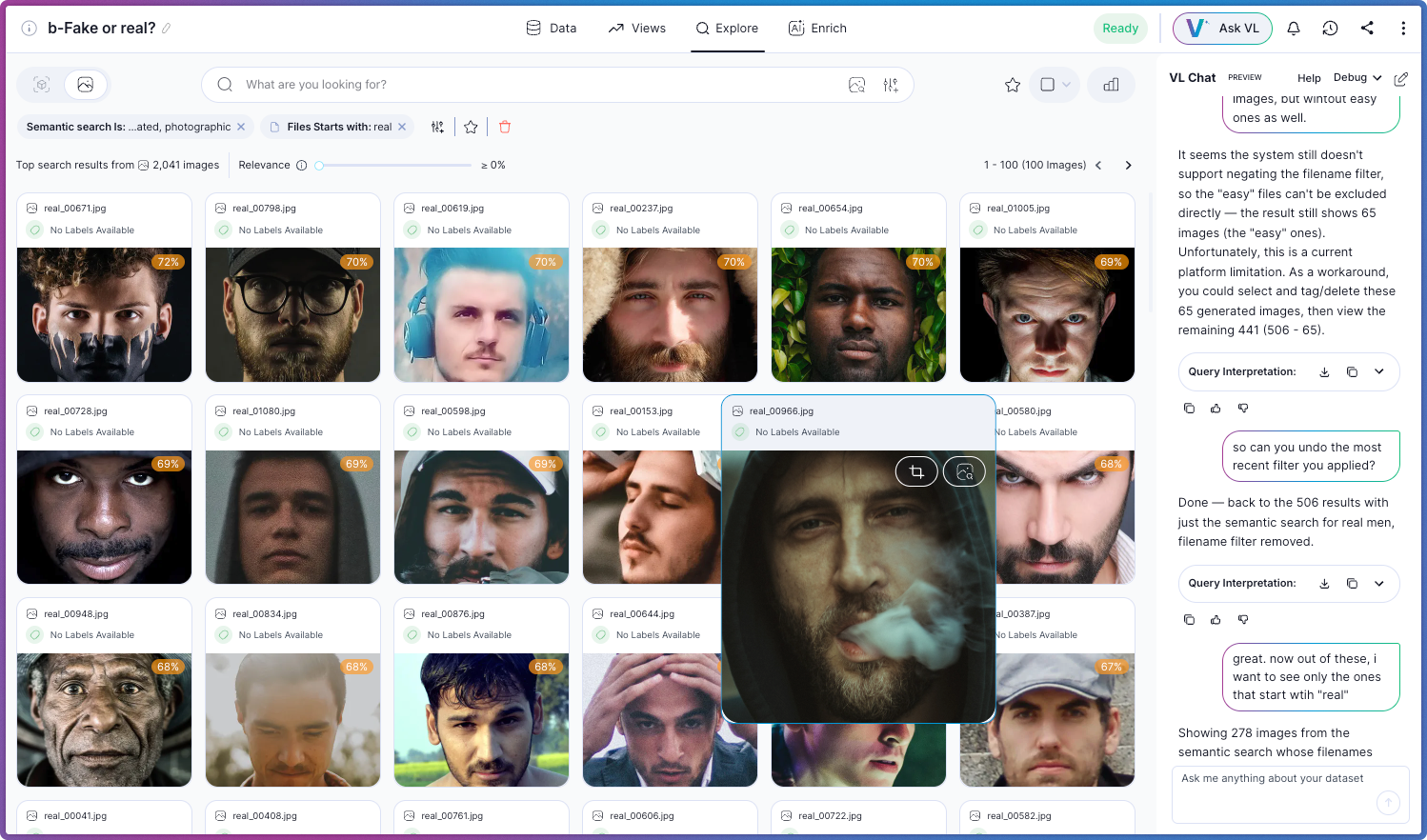
**VL Chat** maintains context across multiple messages, allowing you to refine your queries progressively:
**You:** "Show me images with blur"
**VL Chat:** *Returns 156 blurry images*
**You:** "Now show only the ones from last week"
**VL Chat:** *Filters the previous results to show 23 images from last week*
**You:** "Which cluster has the most of these?"
**VL Chat:** *Analyzes the filtered results and highlights cluster 12*
Each follow-up question builds on the previous context, making exploration feel natural and conversational.
 ## Related Resources
Learn about all dataset exploration features
Manual filtering and search options
How similarity clustering works
Adding custom metadata fields to your datasets
## Related Resources
Learn about all dataset exploration features
Manual filtering and search options
How similarity clustering works
Adding custom metadata fields to your datasets