
Setting Up
You can follow along this tutorial by running this notebook on Google Colab.🚧 Google Colab Free Tier Running this tutorial on Google Colab is possible but may take a while to complete due to the low computing resources provided in the free tier. We recommend running this tutorial on your local machine, Google Colab Pro, or equivalent.If you’re running this tutorial on your local machine, install fastdup with:
0.906.
For a detailed list of installation options and supported platforms, see our installation guide.
Download Dataset
For the purpose of demonstration, we will be using the food-101 dataset which consists of 101 food classes with 1,000 images per class. Download and extract the dataset by running:food-101/images folder which contains the images.
📘 Why this dataset? We use the food-101 dataset in this tutorial because of the general availability of the dataset to the public. Bear in mind this is a highly curated dataset, and we may not find as many issues compared to a non-curated dataset. Feel free to swap out this dataset for your own!
Run fastdup
With the folder set in place, let’s run fastdup:📘 Parameters
work_dir- Path to store the artifacts generated from the run.input_dir- Path to the images.ccthreshold- The cluster threshold parameter. Controls the minimal distance for clustering. Defaults to0.96. Best value ofccthresholdvaries depending on use case and data.
- A higher threshold clusters images that are highly similar resulting in fewer images in a cluster.
- A lower threshold clusters less similar images together. Clusters have more diversity and a larger possible difference between images in the cluster.
👍 Reduce run time on free tier of Google Colab If you’re running this tutorial on the free tier of Google Colab, we recommend running the analysis on a subset of the dataset instead of the entire dataset. This is done to reduce the waiting time for the run to complete. You can specify the number of images to run on by specifying theOnce the run completes, you can get a summary of the run with:num_imagesargument infd.run. For example,fd.run(num_images=40000)runs only on 40,000 images in the dataset.
Broken Images
Similar to the previous tutorial, let’s start with low-hanging fruit of finding corrupted images:📘 No broken images! The output shows no broken images. So we are good to go here.However, if there are broken images present (like in the previous tutorial), you’d see something like the following:
List of Broken Images
To get a list of broken images run:👍 Tips You can store these output list somewhere to take further action on. You might want to move the files, delete it, or relabel them.
Duplicates
Let’s visualize duplicate image pairs with: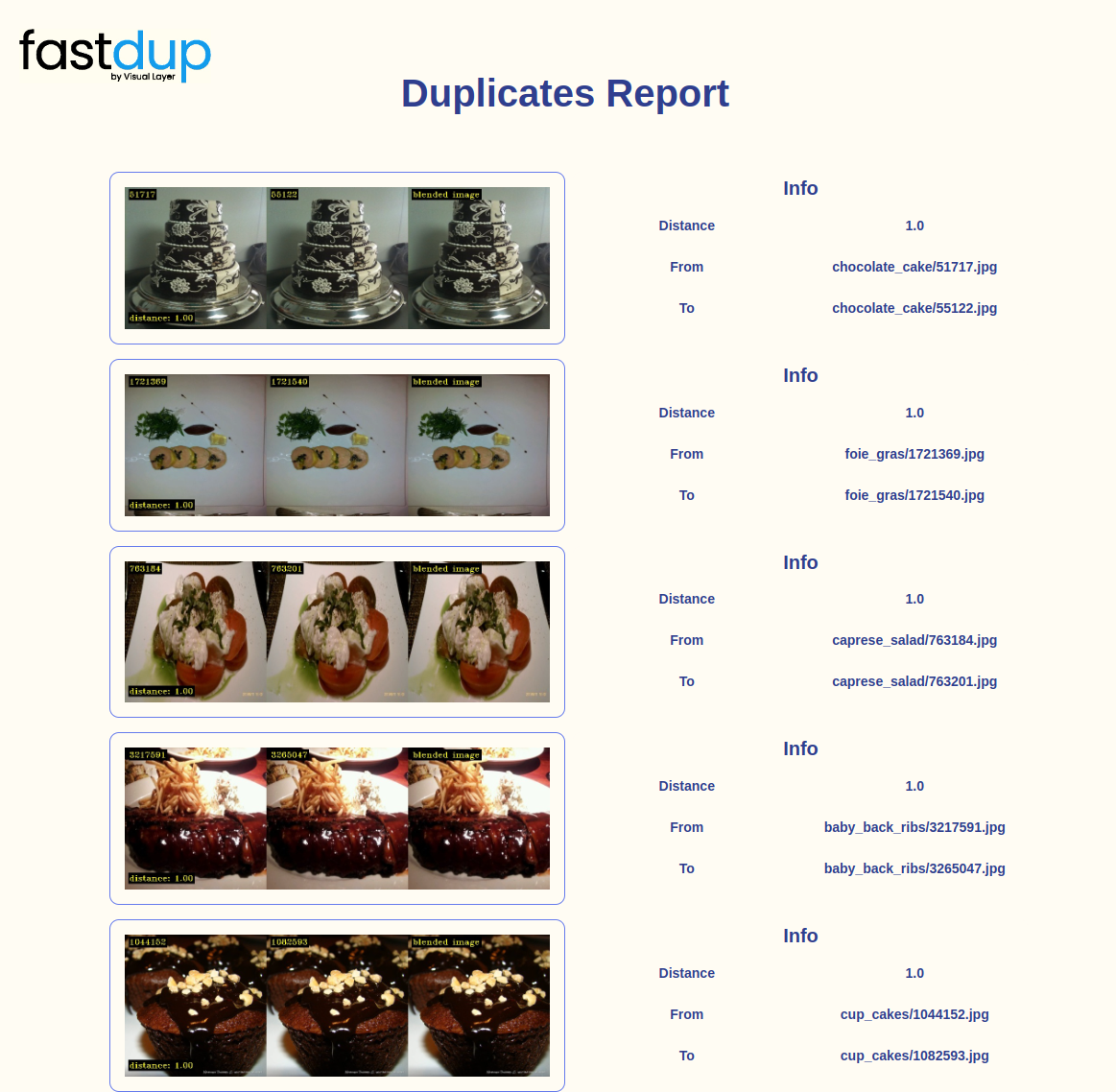
👍 Tips
- Setting
num_images=5shows a gallery of 5 duplicate pairs. Change this value to view more/less.- Running
fd.vis.duplicates_galleryalso saves the resultingduplicates.htmlfile intofastdup_food101_work_dir/gallery/.- Distance of
1.0indicates that the image is an exact copy.
Image Clusters
You can visualize image clusters with: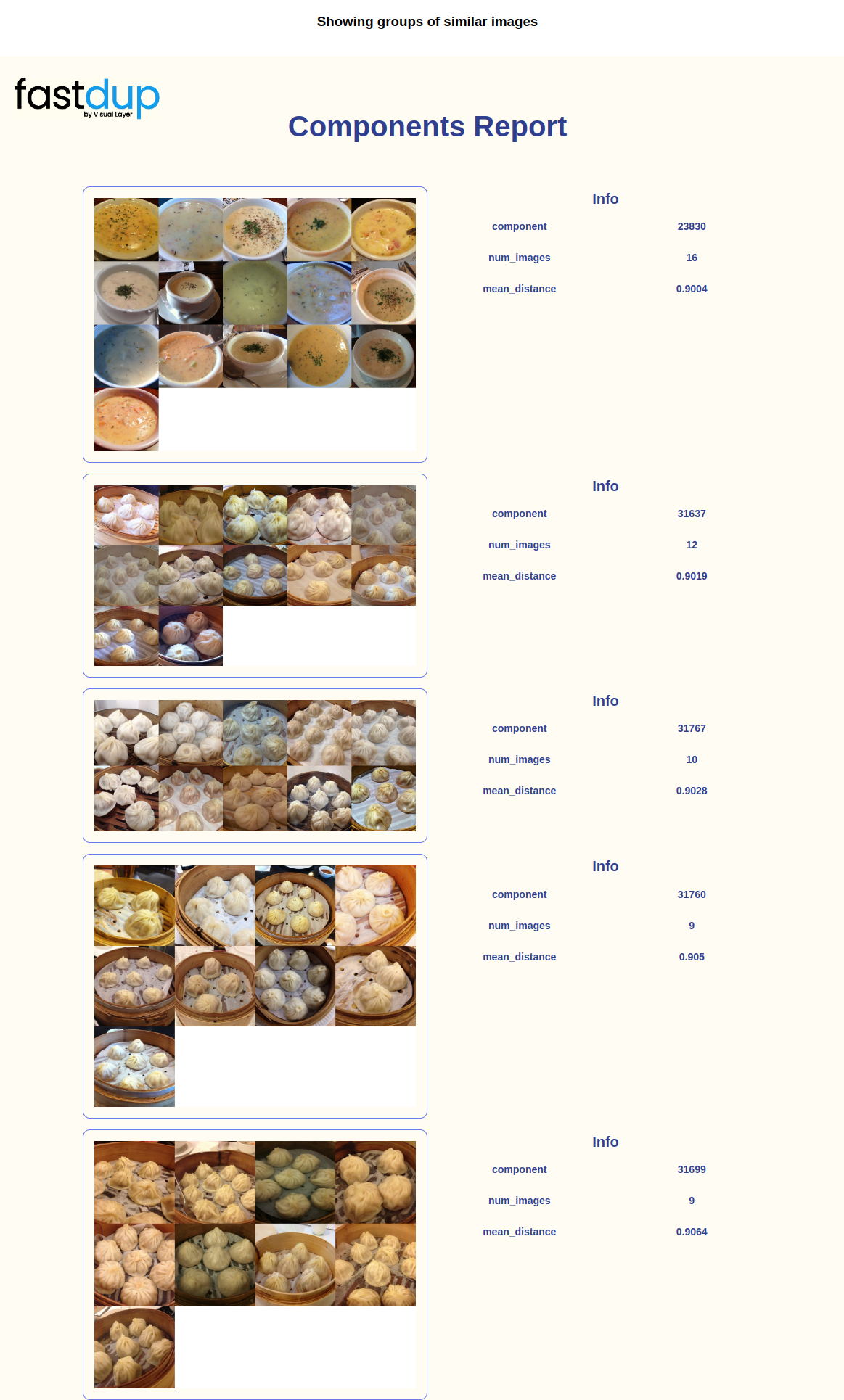
List of Duplicates
Now let’s single out all duplicates and near-duplicates by running using the connected components function:| fastdup_id | component_id | sum | count | mean_distance | min_distance | max_distance | img_filename | error_code | is_valid | |
|---|---|---|---|---|---|---|---|---|---|---|
| 0 | 0 | 0 | 0.0 | 0.0 | 0.0 | 0.0 | 0.0 | apple_pie/1005649.jpg | VALID | True |
| 1 | 1 | 1 | 0.0 | 0.0 | 0.0 | 0.0 | 0.0 | apple_pie/1011328.jpg | VALID | True |
| 2 | 2 | 2 | 0.0 | 0.0 | 0.0 | 0.0 | 0.0 | apple_pie/101251.jpg | VALID | True |
| 3 | 3 | 3 | 0.0 | 0.0 | 0.0 | 0.0 | 0.0 | apple_pie/1014775.jpg | VALID | True |
| 4 | 4 | 4 | 0.0 | 0.0 | 0.0 | 0.0 | 0.0 | apple_pie/1026328.jpg | VALID | True |
| img_filename | mean_distance | count | |
|---|---|---|---|
| component_id | |||
| 23830 | [clam_chowder/1072684.jpg, clam_chowder/1113834.jpg, clam_chowder/1322415.jpg, clam_chowder/1437241.jpg, clam_chowder/2113399.jpg, clam_chowder/2140703.jpg, clam_chowder/2248997.jpg, clam_chowder/2361787.jpg, clam_chowder/2398168.jpg, clam_chowder/2542800.jpg, clam_chowder/2685745.jpg, clam_chowder/2770581.jpg, clam_chowder/3914755.jpg, clam_chowder/546975.jpg, clam_chowder/75800.jpg, clam_chowder/854517.jpg] | 0.9163 | 16 |
| 31637 | [dumplings/1045500.jpg, dumplings/140004.jpg, dumplings/1630799.jpg, dumplings/1695231.jpg, dumplings/1848359.jpg, dumplings/1872410.jpg, dumplings/1918394.jpg, dumplings/2524385.jpg, dumplings/3683752.jpg, dumplings/3739057.jpg, dumplings/3781725.jpg, dumplings/468796.jpg] | 0.9302 | 12 |
| 31767 | [dumplings/1450685.jpg, dumplings/1564985.jpg, dumplings/2500721.jpg, dumplings/2600333.jpg, dumplings/2606645.jpg, dumplings/2675187.jpg, dumplings/3030550.jpg, dumplings/3242297.jpg, dumplings/3532122.jpg, dumplings/625116.jpg] | 0.9127 | 10 |
| 31760 | [dumplings/1433645.jpg, dumplings/1813271.jpg, dumplings/1881086.jpg, dumplings/1998135.jpg, dumplings/2229749.jpg, dumplings/2561548.jpg, dumplings/2750447.jpg, dumplings/3363745.jpg, dumplings/834049.jpg] | 0.9119 | 9 |
| 31699 | [dumplings/1228546.jpg, dumplings/1270308.jpg, dumplings/231028.jpg, dumplings/2373653.jpg, dumplings/2571523.jpg, dumplings/263589.jpg, dumplings/2909040.jpg, dumplings/2950605.jpg, dumplings/3191742.jpg] | 0.9180 | 9 |
list_of_duplicates:
Outliers
Now, visualize the outliers with: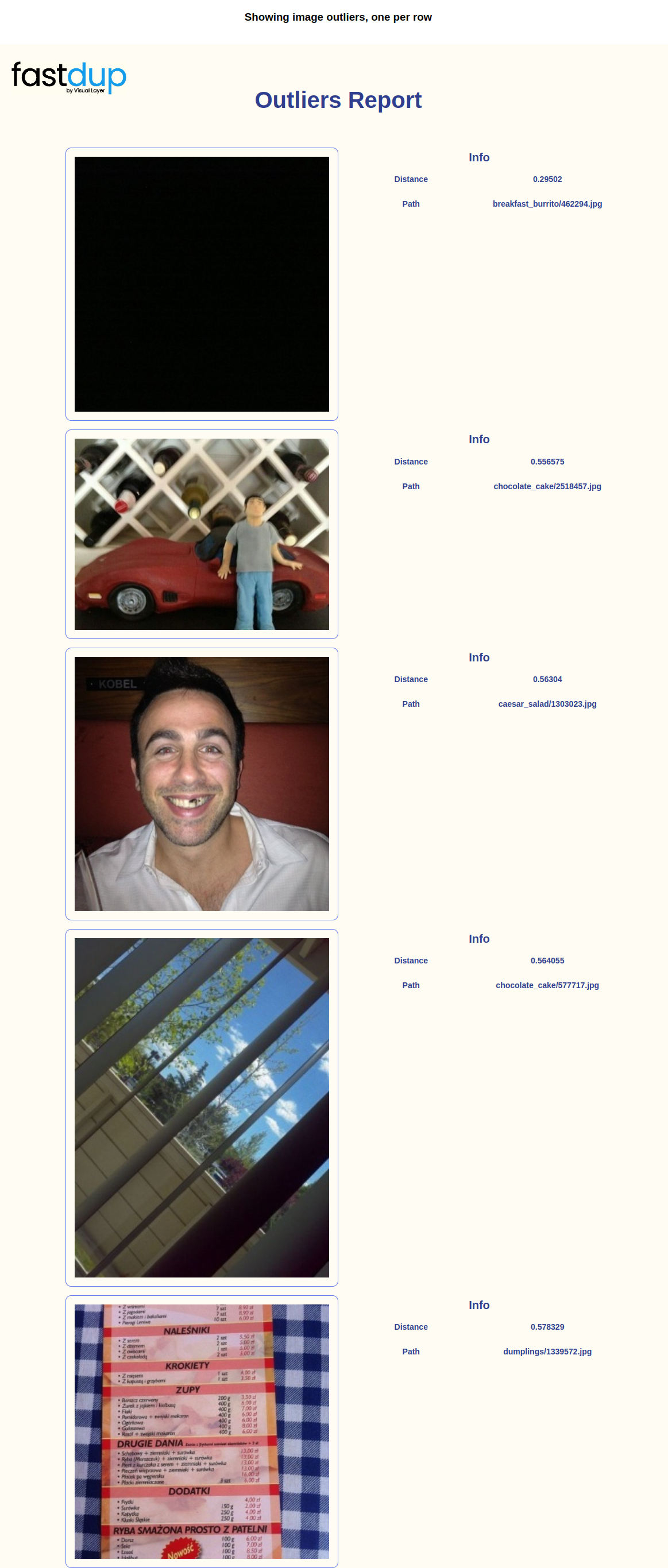
👍 Tips
- Lower
Distancevalue indicates the image is different than others in the dataset. Hence, the lower theDistancevalue, the higher the chances of outliers.- Since we know that the label of the image is by the name of the parent folder, we can already spot a couple of outliers from this gallery. For example, take the last image in the gallery, the label is given as
dumplingsbut the image does not contain any dumplings.
List of Outliers
Let’s first get the outliersDataFrame:
| index | outlier | nearest | distance | img_filename_outlier | error_code_outlier | is_valid_outlier | img_filename_nearest | error_code_nearest | is_valid_nearest | |
|---|---|---|---|---|---|---|---|---|---|---|
| 0 | 3999 | 9797 | 27221 | 0.295020 | breakfast_burrito/462294.jpg | VALID | True | creme_brulee/1661605.jpg | VALID | True |
| 1 | 3997 | 21410 | 37470 | 0.556575 | chocolate_cake/2518457.jpg | VALID | True | filet_mignon/2685908.jpg | VALID | True |
| 2 | 3995 | 11063 | 16727 | 0.563040 | caesar_salad/1303023.jpg | VALID | True | cheesecake/358018.jpg | VALID | True |
| 3 | 3994 | 21885 | 2669 | 0.564055 | chocolate_cake/577717.jpg | VALID | True | baklava/3363412.jpg | VALID | True |
| 4 | 3992 | 32123 | 31207 | 0.578329 | dumplings/1339572.jpg | VALID | True | donuts/1750980.jpg | VALID | True |
distance<0.68 as outliers:
Dark, Bright, Blurry Images
Similar to the previous tutorial, we can visualize the dark, bright, and blurry images with:List of Dark Images
Get a DataFrame of dark images:mean<13 then we conclude it’s a dark image:
| fastdup_id | img_w | img_h | unique | blur | mean | min | max | stdv | file_size | contrast | img_filename | error_code | is_valid | |
|---|---|---|---|---|---|---|---|---|---|---|---|---|---|---|
| 3090 | 3090 | 512 | 306 | 0 | 535.7338 | 5.5205 | 0.0 | 255.0 | 15.3110 | 27433 | 1.0 | beef_carpaccio/1259270.jpg | VALID | True |
| 9797 | 9797 | 511 | 512 | 0 | 9.0875 | 1.8431 | 0.0 | 30.0 | 1.0524 | 8693 | 1.0 | breakfast_burrito/462294.jpg | VALID | True |
List of Bright Images
Similar to the above, let’s set that ifmean>220.5 we will conclude it’s a bright image:
| fastdup_id | img_w | img_h | unique | blur | mean | min | max | stdv | file_size | contrast | img_filename | error_code | is_valid | |
|---|---|---|---|---|---|---|---|---|---|---|---|---|---|---|
| 81 | 81 | 512 | 512 | 0 | 538.6821 | 225.8266 | 0.0 | 255.0 | 32.2799 | 32229 | 1.0 | apple_pie/1289014.jpg | VALID | True |
| 436 | 436 | 512 | 512 | 0 | 1245.6737 | 220.9703 | 0.0 | 255.0 | 40.3034 | 40344 | 1.0 | apple_pie/2601590.jpg | VALID | True |
| 589 | 589 | 512 | 512 | 0 | 1468.0642 | 227.5742 | 0.0 | 255.0 | 41.6247 | 50437 | 1.0 | apple_pie/2997124.jpg | VALID | True |
| 933 | 933 | 512 | 512 | 0 | 554.9135 | 232.6887 | 0.0 | 255.0 | 41.5226 | 41395 | 1.0 | apple_pie/817552.jpg | VALID | True |
| 1115 | 1115 | 512 | 512 | 0 | 1219.0579 | 230.7839 | 0.0 | 255.0 | 32.7307 | 52154 | 1.0 | baby_back_ribs/1395570.jpg | VALID | True |
List of Blurry Images
Similarly with blur images| fastdup_id | img_w | img_h | unique | blur | mean | min | max | stdv | file_size | contrast | img_filename | error_code | is_valid | |
|---|---|---|---|---|---|---|---|---|---|---|---|---|---|---|
| 2123 | 2123 | 512 | 512 | 0 | 41.3781 | 116.2239 | 2.0 | 198.0 | 30.7362 | 25479 | 0.9800 | baklava/1413667.jpg | VALID | True |
| 2768 | 2768 | 384 | 512 | 0 | 45.5609 | 102.8172 | 40.0 | 226.0 | 37.5435 | 18740 | 0.6992 | baklava/3681797.jpg | VALID | True |
| 2829 | 2829 | 512 | 512 | 0 | 38.8840 | 214.0211 | 71.0 | 255.0 | 25.0954 | 23869 | 0.5644 | baklava/3877397.jpg | VALID | True |
| 2918 | 2918 | 512 | 512 | 0 | 47.2227 | 138.1602 | 0.0 | 255.0 | 24.5464 | 22279 | 1.0000 | baklava/683225.jpg | VALID | True |
| 6924 | 6924 | 384 | 512 | 0 | 45.9959 | 75.9253 | 0.0 | 176.0 | 23.9812 | 19018 | 1.0000 | beignets/726875.jpg | VALID | True |
Summary
In this tutorial we found 825 images with potential issues.👍 TLDR In this tutorial we learned how to:
- Find various dataset issues with fastdup.
- Collect problematic images for further action.